
| Home | Products | Prices | Directory | Order | Contact | New | Books | Files | Links | Other |
Welcomes you to SPJ Systems.
| Bottom of Page |

SPJ Systems is a software development company based in Pune (India), offering its services and products to customers all over the world. Since beginning in 1992, SPJ's customer list has grown to include some of the best names in the Industry.We undertake custom software development projects - especially in the area of communications software, system software and firmware. The skills we have include : C (for DOS / UNIX), C++ (for Windows), Assembly language (80x86, 80x51, Z80, 68HC11, PIC, AVR)
We have some software products - especially suitable for a firmware engineer :
- SIM85 : Simulator / debugger software for 8085 micro-processor.
- SIM51 : Simulator / debugger software for 8051 micro-controller family.
- SLDC51 : ‘C’ cross compiler for 8051 with Source Level Debugger.
- IDE51-C : ‘C’ compiler for 8051 with IDE and SLD (for Windows95/98)
- C-AVR : 'C' compiler for AVR family micro-controllers (for Windows95/98)
SIM85
Simulator for 8085 micro-processor.
This software simulates the 8085 CPU on a PC. You can debug programs written for 8085 using this simulator. It displays the 8085 CPU registers on the screen. The disassembled program is also displayed on the screen. You can single step through the program, and at the same time watch selected memory locations. Besides, it also simulates some commonly used peripherals, e.g. 8279, 8255, 8155, LCD etc. While running / stepping through the program, you can also monitor the status of these peripherals. You can even simulate input to these peripherals. e.g. a key entry through 8279 can be simulated. Or you can change the input to any of the 8255 ports anytime.Download a free demonstration copy of SIM85.(file size approximately 75 kb) This is demo copy. It has all the features, except that it will not load a program more than 2Kbytes in size.
Or Demo SIM85 from Dontronics.
To install demo of SIM85 :Create a directory on your hard disk (e.g. C:\SIM85) and copy the file LHASIM85.EXE in it. To install the demo version, just run LHASIM85.EXE from the DOS prompt. It will explode and create many other files. It includes SIM85.EXE i.e. the Simulator. You may run it and debug small programs (.BIN or .HEX files)
Even though this is DEMO ONLY version, it is full feature Simulator with only one limitation : It will not load programs more than 2 KBytes in size. However this limitation applies to this free demo version only; the actual Simulator (which you can purchase) does not have any such limit for the size of input file.
SIM51
Simulator for 8051 series of micro-controllers.
This software simulates the 8051 micro-controller on a PC. You can debug programs written for 8051 using this simulator. It displays the 8051 CPU registers (R0 to R7, Acc., PC, SP, DPTR etc.) on the screen. The disassembled program is also displayed on the screen. You can single step through the program, and at the same time watch selected memory locations (from Program Memory, External Data Memory, Internal Data Memory or SFR). Besides, it also simulates some commonly used peripherals, e.g. 8279, 8255, 8155, LCD etc. While running/ stepping through the program, you can also monitor the status of these peripherals. You can even simulate input to these peripherals. e.g. a key entry through 8279 can be simulated. Or you can change the input to any of the 8255 ports anytime.This product is right now available for DOS platform only. However, we will soon release Windows version of this Simulator (WSIM51). It will have better features like a separate window to view serial port output (also to simulate input), capacity to accommodate more memory and I/O watches etc.
Download a free demonstration copy of SIM51.(file size approximately 95 kb) This is demo copy. It has all the features, except that it will not load a program more than 2Kbytes in size.
Or Demo SIM51 from Dontronics.
To install demo of SIM51 :Create a directory on your hard disk (e.g. C:\SIM51) and copy the file LHASIM31.EXE in it. To install the demo version, just run LHASIM31.EXE from the DOS prompt. It will explode and create many other files. It includes SIM31.EXE i.e. the Simulator. You may run it and debug small programs (.BIN or .HEX files)
Even though this is DEMO ONLY version, it is full feature Simulator with only one limitation : It will not load programs more than 2 KBytes in size. However this limitation applies to this free demo version only; the actual Simulator (which you can purchase) does not have any such limit for the size of input file.
SLDC - 51
‘C’ Cross Compiler for 8051 series with Source Level Debugger SLDC51 : ‘C’ cross compiler for 8051 series of micro-controllers. It generates fast, compact assembly code from the user's C program. Allows user to write 8051 applications in a higher level language - 'C' - instead of assembly language, thereby drastically reduces the software development time. It offers all benefits of a higher level language at a very affordable price. The product includes a Compiler and a Source Level Debugger. It supports a subset of ANSI ‘C’ language specification with some extensions specific to 8051 family - e.g. ‘bit’ variables. The supported data types include bit, char, int, long int, float and also arrays and pointers. The library includes a wide range of functions - string handling, conversions, I/O related and also math functions such as sin, cos etc. All Special Function Registers (SFRs) of the micro-controller can be accessed as if those were variables. User can add SFR definitions also, so this compiler can be used with almost all 8051 derivatives such as 80535, 80552, 80320, 89C2051 and so on. It includes Pre-processor, Compiler, Optimizer, Assembler, Linker, Library Manager and a Source Level Debugger (SLD). Compiler directives such as #define, #ifdef etc. can be used. The compiler supports two memory models : You may use Large memory model if external DATA memory is available. Otherwise, you may use Small memory model. In the later case, the compiler puts all variables in the internal RAM (128 or 256 bytes). Regardless of memory model, you can force variables to reside ANYWHERE in RAM. This is especially useful for handling memory mapped I/O devices. The compiler allows a special type of function : ‘interrupt’ for writing Interrupt Service Routines in C language and the compiler takes care of context saving and restoring.Since the compiler produces OMF format output, it can be used with an ICE (because most In Circuit Emulators support OMF format files). However, you can also debug the program using the Source Level Debugger (which is included in SLDC51)
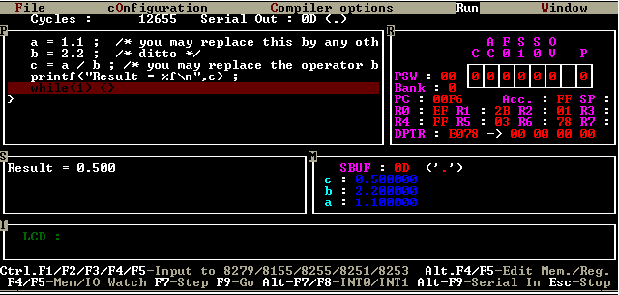
The Source Level Debugger (SLD) further enhances the utility of compiler greatly by providing a debugging tool which goes hand in hand with the C compiler. It simulates the 8051 micro-controller (and also commonly used peripherals such as LCD) on the PC. It displays your source program (C language) on the screen, and you can single step through your program. While doing so, you can monitor Registers / Memory dump / SFRs / C language variables on the screen. You can even modify the contents of any of the above while the program is running. You can also simulate input to peripherals. This includes on-chip peripherals like serial port and external peripherals like 8255. Using this SLD, you can actually debug your program without the target hardware (under simulated conditions). Standard debugging features like break points etc. are included. Special features include ability to detect software bugs such as stack overflow, reading / writing from / to invalid memory locations etc. The SLD screen looks something like this :
Highlights of The C Compiler :
ROMable code / OMF / Intel HEX format file generation. Can be used with almost any ICE.
Built-in Pre-processor, Compiler, Optimizer, Assembler and Linker.
Supports mixed language (‘C’ + Assembly) programming and in-line assembly also.
Two memory models - Large (using external RAM) and Small (without external RAM).
Code can be generated at an offset (optionally). This is useful for chips like the Dallas DS5000 etc.
Single precision Floating Point Arithmetic.
Supported data types : bit, char, unsigned char, int, unsigned int, long int, unsigned long int, float, arrays, pointer.
Supports compiler directives like #define, #ifdef etc.
Interrupt Service Routines can be written in ‘C’ or Assembly.
Access to all SFRs of the micro-controller. In fact you can use this compiler for 8051 derivatives also (like 80535, 80552, 80320 etc.) by declaring additional SFRs.
Numerous functions included in the library - some of them with source code.
Highlights of The Source Level Debugger :To download a free demonstration copy of SLDC51,(file size approximately 700 kb) click here. This demo. version has all features, except, it will not compile a program > 25 lines long.With this debugger, program development, testing and debugging can be done without stand-alone hardware or In-Circuit Emulator.
Although SLDC51 is avaliable for DOS platform only, we also have another product - IDE51-C - which runs on Windows95. It combines the features of SIM51 and Source Level Debugger and improves over them.Simulates the 8051 micro-controller on the PC.
Run / single step through your source program.
Monitor Registers / Memory dump / SFRs / C language variables on the PC’s screen.
Simulates some commonly used peripherals like LCD module, 8255 etc.
Separate window to view serial port output.
User can modify contents of any memory location / SFR / C language variable any time.
User can even simulate input to peripheral devices like 8255 ports or the on-chip serial port etc.
Set multiple break-points.
Traps logical run-time errors like stack overflow , or reading un-initialized memory location.
Or Demo SLDC51 from Dontronics.
To install demo of SLDC31 :Create a directory on your hard disk (e.g. C:\SLDC31) and copy the file LHAC31.EXE in it. To install the demo version, just run LHAC31.EXE from the DOS prompt. It will explode and create many other files and sub-directories. It includes C31.EXE (the compiler) and SLDC31.EXE (the Source Level Debugger). It also contains a sub-directory MANUALS. It contains COMPILER.TXT and DEBUGGER.TXT which are ASCII format user's manuals for the C compiler and the Source Level Debugger respectively. The same directory also contains COMPILER.DOC and DEBUGGER.DOC which are Word DOCument files for the same, so that if you want, you may take a print out of these DOC files.
Even though this is DEMO ONLY version, it is full feature compiler with only one limitation : It will not compile programs more than 25 lines long. However this limitation applies to this free demo version only; the actual compiler (which you can purchase) does not have any such limit for the size of input file.
Send email to us, to get the list of projects/products completed (by our customers) using our C compiler for 8051.
Benchmark program :/*
This is a benchmark program for long int arithmetic. When compiled with small memory model, it generates 452 bytes of code and it takes 2563 cycles to reach the "while(1)" statement. When compiled with small memory model with /F (optimize for speed) option, it generates 604 bytes of code and it takes 936 cycles to reach the "while(1)" statement. You may try to compile this same benchmark program using other C cross compilers, and compare the results yourself.*/
long int v1, v2, v3 ;
void main () {
v1 = 123456L ;
v2 = 456L ;
v3 = v1 + v2 ; /* answer = 123912 */
v3 = v1 / v2 ; /* answer = 270 */
v3 = v1 * v2 ; /* answer = 56295936 */
while(1) {}
}
IDE51-C : ‘C’ compiler for 8051 series of micro-controllers with a built-in Source Level Debugger (SLD) and a complete Integrated Development Environment (IDE). It runs on Windows95 (or Windows98). It generates fast, compact assembly code from the user's C program. Allows user to write 8051 applications in a higher level language - 'C' - instead of assembly language, thereby drastically reduces the software development time. It offers all benefits of a higher level language at a very affordable price. The product actually includes a Win95 based Integrated Development Environment and our DOS based SLDC51 (with slight modifications). So effectively, it includes an IDE with Editor, Compiler, and a Simulator / Debugger for 8051. The IDE51-C runs on Windows95.Since the compiler produces OMF format output, it can be used with an ICE (because most In Circuit Emulators support OMF format files). However, you can also debug the program using the software simulator / debugger (which is included in IDE51-C)
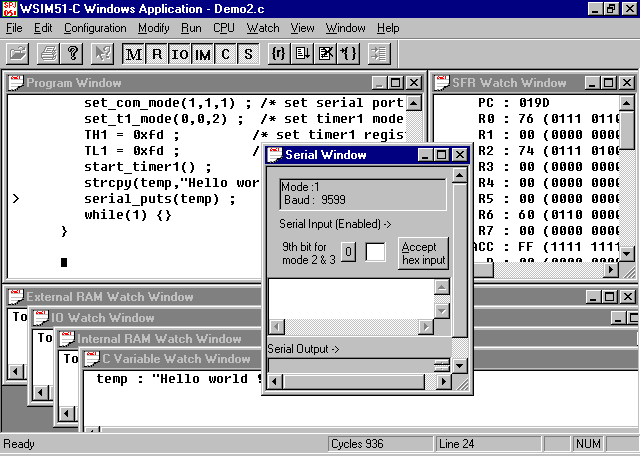
The Simulator / Debugger (SLD) (runs on Win95) further enhances the utility of compiler greatly by providing a debugging tool which goes hand in hand with the C compiler. It simulates the 8051 micro-controller (and also commonly used peripherals such as LCD) on the PC. It displays your source program (C language) on the screen, and you can single step through your program. While doing so, you can monitor Registers / Memory dump / SFRs / C language variables on the screen. You can even modify the contents of any of the above while the program is running. You can also simulate input to peripherals. This includes on-chip peripherals like serial port and external peripherals like 8255. Using this SLD, you can actually debug your program without the target hardware (under simulated conditions). Standard debugging features like break points etc. are included. New features include detecting software bugs such as stack overflow, reading / writing from / to invalid memory locations etc. The SLD screen looks something like this :
Highlights of The C Compiler :
The C compiler which is a part of IDE51-C is same as the compiler which is also a part of SLDC51.Highlights of The Source Level Debugger :
Also, the SLD in IDE51-C has all the features (and more) of that in SLDC51. So, please click here to goto SLDC51 page (to read more about the SLD features). Only the additional features of this SLD are mentioned here :
Separate window for Serial Port o/p and i/p.
This simulator / debugger can be also used in a "Stand-alone" mode. i.e. you can use it to debug your 8051 programs, even if you have NOT used our compiler. It can also accept the program as a BINary or Intel HEX format file. In this case, it dis-assembles the code and displays the mnemonics in the program window.A demo version of IDE51-C can be downloaded free. Click here to download the demo. Although it is demo version, it has all the features with only one limitation : It will not compile programs more than 25 lines long. Also, if a BINary or HEX file is opened in the Debugger, then it will load only first 2Kbytes of the code.
CAVR : ‘C’ cross compiler for Atmel's AVR series of micro-controllers. It generates fast, compact assembly code from the user's C program. Allows user to write applications in a higher level language - 'C' - instead of assembly language, thereby drastically reduces the software development time. It offers all benefits of a higher level language at a very affordable price. The product includes an Integrated Development Environment and a C Compiler for AVR Series. The compiler generates assembly language code which can be assembled using AVRASM assembler from Atmel. The Compiler supports almost all features of ANSI C and also some AVR Series specific extensions, so the user can take full advantage of the special features of micro-controller. Here is a list of the features of CAVR and also the differences between ANSI C and this compiler :
- Supported data types : char, unsigned char, int, unsigned int, long int, unsigned long int, float.
- Arrays of any data type are supported, but they can have maximum 3 dimensions.
- Pointers to any data type are supported, but they can be maximum 3 levels. i.e. pointer to pointer to pointer to char (or any data type) is allowed, but pointer to pointer to pointer to pointer to char (or any data type) is NOT allowed.
- 'struct' and 'union' are supported, but bitfields are not supported.
- An extra keyword 'SFR' is added, so users can declare and use any / all Special Function Registers of AVR series.
- Global variables are stored in memory starting from address 0x60 in on-chip RAM. When the on-chip RAM is completely used, external RAM is used to store global variables. Stack Pointer is placed at the end of RAM or at a user specified location.
- Local variables and function parameters are stored on stack. So all functions are fully re-entrant. Available stack space is the only limit for re-entry / recursions.
- Supports mixed language ('C' + assembly) programming.
- This version supports maximum :
AT90S2313 AT90S4414 AT90S8515 ATmega103/603 CODE 2K Bytes 4K Bytes 8K Bytes 64K Bytes DATA 128 Bytes 256 Bytes 512 Bytes 2/4K Bytes You can download the demo of CAVR and try it with your hardware. Click here to request for demo of CAVR.
- C-AVR runs on a PC runing Windows95 or Windows98.
Actually it is possible to generate 128KBytes code, but the only problem is while reading constants from code memory. To read code memory addresses betweeb 64K and 128K, you must use the ELPM instruction instead of LPM instruction. Currently our compiler does not generate the ELPM instruction, it always generates LPM instruction. So if constant data is stored in program flash above the address 64K, it may cause problems. That is why we have mentioned that it can only generate code up to 64KBytes. Actually, we are very near to removing this limitation, so pretty soon, you will be able to generate full 128KBytes code. Please note, we give software upgrades free of cost.
> > Is the object code from C-AVR fully compatible with the AA90.EXE
ATMEL
> > assembler?
It is compatible with Atmel AVRASM.EXE assembler.
> > Does C-AVR support floating point?
Yes, it supports single precision (4 byte) floating point variables.
> > Does C-AVR allow ADC control in the ATmega103, which includes
8 channels
> > of analog mux to the 10 bit ADC?
Yes. ADC is controlled by reading / writing special I/O register. These can be declared as SFRs and can be used in your C program.
Regards,
Pramod Ranade
-----------------------------------------------------------------
SPJ Systems
Tel. : +91-20-4451607
114, Chitrashala Building Fax.
: +91-20-4480285
562, Sadashiv Peth
E-mail : spj@spjsystems.com
Pune - 411 030 (INDIA)
URL : http://www.spjsystems.com
-----------------------------------------------------------------
| Simulator for 8085 micro-processor. (SIM85)-( for DOS) | ~$49USD |
| Simulator for 8051 series of micro-controllers. (SIM51)-( for DOS) | ~$49USD |
| ‘C’ cross compiler for 8051 series of micro-controllers (SLDC51)-( for DOS) | ~$199USD |
| IDE51-C : ‘C’ compiler for 8051 with IDE and SLD (for Windows95/98) | ~$275USD |
| C-AVR : 'C' compiler for AVR family micro-controllers (for Windows95/98) | ~$199USD |
NOTE **** Dontronics can't sell any SPJ Systems product to Customers
residing in India.
SPJ Systems
114, Chitrashala Building,
562, Sadashiv Peth,
PUNE - 411 030
INDIA
Tel. : +91-20-4451607
Fax. : +91-20-4480285
E-mail : spjs@giaspn01.vsnl.net.in
You must send us your E-Mail address with the order, as this is the
only method of distribution of these products.
| What's Really HOT at DonTronics?
|
| Home | Products | Prices | Directory | Order | Contact | New | Books | Files | Links | Other |

mailto: don@dontronics.com_
Copyright © 1996-99 DonTronics
| Top of Page |